
Toyota Corolla: Before driving / Head restraints
Toyota Corolla 2019-2026 Owners Manual / Before driving / Head restraints
Head restraints are provided for all seats.
WARNING
■Head restraint precautions Observe the following precautions regarding the head restraints. Failure to do so may result in death or serious injury.
- Use the head restraints designed for each respective seat.
- Adjust the head restraints to the correct position at all times.
- After adjusting the head restraints, push down on them and make sure they are locked in position.
- Do not drive with the head restraints removed.
 Rear seats
The seatbacks of the rear seats can be folded down.
Folding down the rear seatbacks
1 Move the front seats forward. (®P.133)
2 Stow the rear armrest. (if equipped) (®P...
 Adjusting a head restraint
■ Front seats
1 Up
Pull the head restraints up.
2 Down
Push the head restraint down while pressing the lock release button A.
■ Rear outside seats (adjustable type)
1 Up
Pull the head restraints up...
Other information:
Toyota Corolla 2019-2026 Owners Manual: “Setup” screen
“Setup” screen Press the “MENU” button, then select “Setup” to display the “Setup” screen. The items shown on the “Setup” screen can be set. A - Select to change the selected language, operation sound settings, etc. B - Select to set Bluetooth® device and Bluetooth® system settings...
Toyota Corolla 2019-2026 Owners Manual: Content of driving information
■ Display items Speedometer display/Driving range (4.2-inch display) Fuel economy Eco Driving Indicator/Driving range (if equipped) ■ Speedometer display/Driving range (4.2-inch display) Speedometer display Driving range Displays driving range with remaining fuel...
Categories
- Manuals Home
- 12th Generation Corolla Owners Manual
- PCS (Pre-Collision System)
- Operating instructions
- Engine immobilizer system
- New on site
- Most important about car
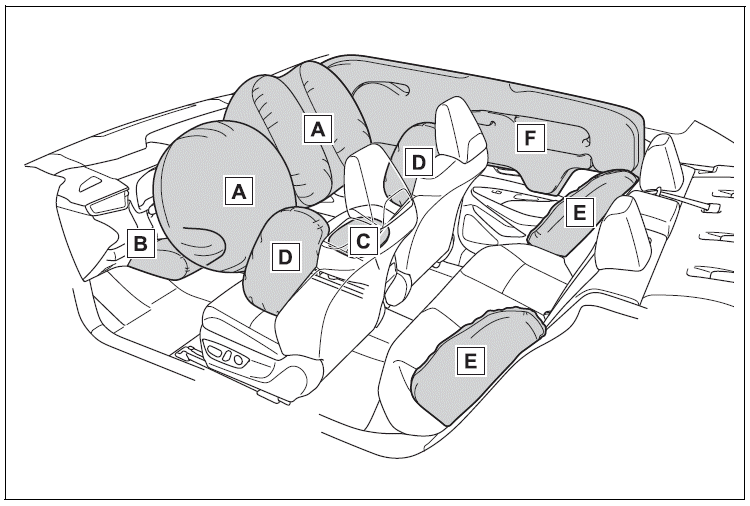
SRS airbags
The SRS airbags inflate when the vehicle is subjected to certain types of severe impacts that may cause significant injury to the occupants. They work together with the seat belts to help reduce the risk of death or serious injury.
SRS airbag system
■ Location of the SRS airbags

Copyright © 2026 www.tocorolla12.com