
Toyota Corolla: Other interior features / Vanity mirrors
Toyota Corolla 2019-2026 Owners Manual / Interior features / Other interior features / Other interior features / Vanity mirrors
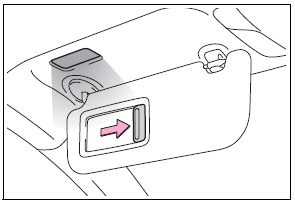
Slide the cover to open.
The vanity light turns on. (if equipped)
■ To prevent battery discharge (vehicles with vanity lights)
If the vanity lights remain on when the engine switch is OFF, the lights will go off automatically after 20 minutes.
NOTICE
■ To prevent the battery from being discharged (vehicles with vanity lights)
Do not leave the vanity lights on for extended periods while the engine is stopped.
 Sun visors
1 To set the visor in the forward position, flip it down.
2 To set the visor in the side position, flip down, unhook, and swing it to the
side.
3 To use the side extender, place the visor in the side position, then slide
it backward...
 Armrest
Fold down the armrest for use.
NOTICE
■ To prevent damage to the armrest
Do not apply too much load on the armrest...
Other information:
Toyota Corolla 2019-2026 Owners Manual: Vehicle identification
■ Vehicle identification number The vehicle identification number (VIN) is the legal identifier for your vehicle. This is the primary identification number for your Toyota. It is used in registering the ownership of your vehicle. On some models: This number is stamped under the right-hand front seat. This number is also stamped on the top left of the instrument panel. This number is also on ..
Toyota Corolla 2019-2026 Owners Manual: System components
A - Meter control switches Turning the Blind Spot Monitor on/off. B - Outside rear view mirror indicators When a vehicle is detected in a blind spot of the outside rear view mirrors or approaching rapidly from behind into a blind spot, the outside rear view mirror indicator on the detected side will illuminate. If the turn signal lever is operated toward the detected side, the outside rear vie..
Categories
- Manuals Home
- 12th Generation Corolla Owners Manual
- Engine immobilizer system
- Sound settings
- Settings display
- New on site
- Most important about car
SRS airbags
The SRS airbags inflate when the vehicle is subjected to certain types of severe impacts that may cause significant injury to the occupants. They work together with the seat belts to help reduce the risk of death or serious injury.
SRS airbag system
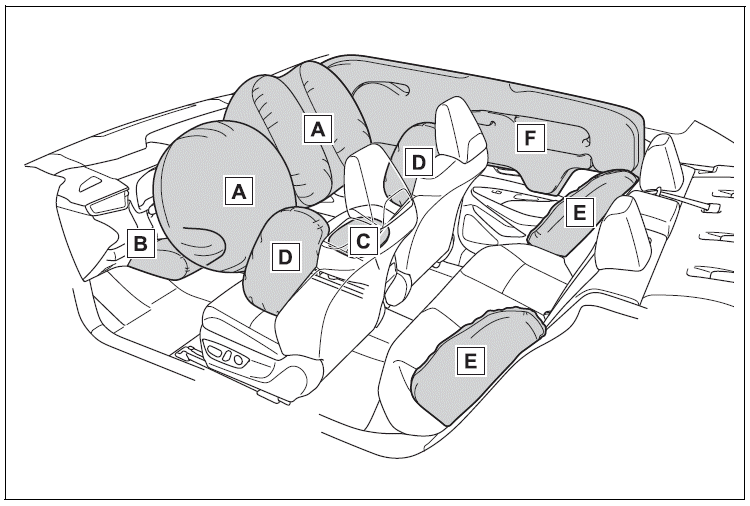
■ Location of the SRS airbags

Copyright © 2026 www.tocorolla12.com