
Toyota Corolla: For safety and security / Child safety
Toyota Corolla 2019-2026 Owners Manual / For safety and security / Child safety
 Exhaust gas precautions
Harmful substance to the human body is included in exhaust gases if inhaled.
WARNING
Exhaust gases include harmful carbon monoxide (CO), which is colorless and
odorless...
 Riding with children
Observe the following precautions when children are in the vehicle. Use a child
restraint system appropriate for the child, until the child becomes large enough
to properly wear the vehicle’s seat belt...
Other information:
Toyota Corolla 2019-2026 Owners Manual: What to do if... (Bluetooth ®). Troubleshooting
If there is a problem with the hands-free system or a Bluetooth® device, first check the table below. Troubleshooting ■ When using the hands-free system with a Bluetooth® device The hands-free system or Bluetooth ® device does not work. ■ When registering/connecting a cellular phone A cellular phone cannot be registered...
Toyota Corolla 2019-2026 Owners Manual: Vehicle signature settings
1 Select “Vehicle Signature” 2 Select the desired item to be set. A - Select to set adding the vehicle signature to outgoing messages on/off. B - Select to edit the vehicle signature. C - Select to reset all setup items. ■ Editing vehicle signature 1 Select “Edit Vehicle Signature”...
Categories
- Manuals Home
- 12th Generation Corolla Owners Manual
- Alarm
- iMT (Intelligent Manual Transmission)
- PCS (Pre-Collision System)
- New on site
- Most important about car
Using the interior lights. Interior lights list
Location of the interior lights
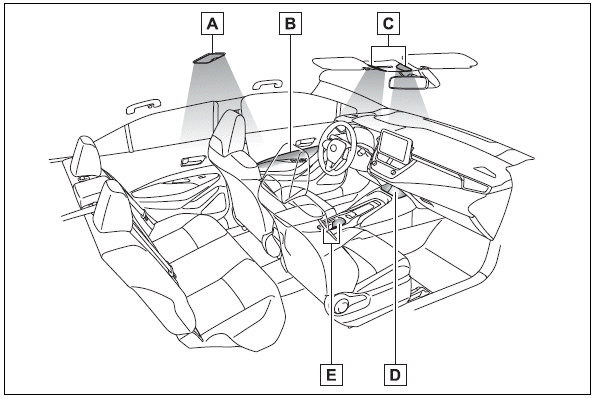
A - Rear interior light
B - Door trim lights
C - Front interior/personal lights
D - Center tray light

Copyright © 2026 www.tocorolla12.com