
Toyota Corolla: For safety and security
Toyota Corolla 2019-2026 Owners Manual / For safety and security
- For safe use
- For safe driving
- Seat belts
- SRS airbags
- Front passenger occupant classification system
- Exhaust gas precautions
- Child safety
- Emergency assistance
- Theft deterrent system
 Toyota Corolla 2019-2026 Owners Manual
Owners handbook for the Toyota Corolla, a compact automobile (formerly subcompact) that is currently in its tenth generation and is sold all over the world...
 For safe use
Before driving
Observe the following before starting off in the vehicle to ensure safety of
driving.
Floor mat
Use only floor mats designed specifically for vehicles of the same model and
model year as your vehicle...
Other information:
Toyota Corolla 2019-2026 Owners Manual: Using Toyota apps
► From the “MENU” button 1 Press the “MENU” button. 2 Select “Apps”. 3 Follow the steps in “From the “APPS” button” from step 3. ► From the “APPS” button 1 Press the “APPS” button. 2 Select “Apps”. If a specific application screen is displayed, select “Apps” again...
Toyota Corolla 2019-2026 Owners Manual: Multi-information display
Display and menu icons ■ Display ► 4.2-inch display A - Driving support system status display area Displays an image when the following systems are operating and a menu icon other than is selected: LTA (Lane Tracing Assist) (if equipped) LDA (Lane Departure Alert with steering control) (if equipped) Dynamic radar cruise control (if equipped) Dynamic radar cruise control with full-speed..
Categories
- Manuals Home
- 12th Generation Corolla Owners Manual
- Transfer contacts from device
- Lubrication system (1.8 L 4-cylinder [2ZR-FAE] engine)
- Engine immobilizer system
- New on site
- Most important about car
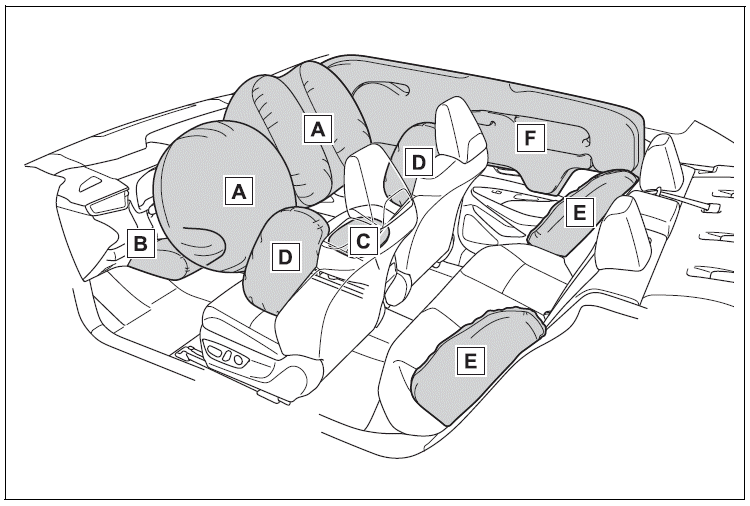
SRS airbags
The SRS airbags inflate when the vehicle is subjected to certain types of severe impacts that may cause significant injury to the occupants. They work together with the seat belts to help reduce the risk of death or serious injury.
SRS airbag system
■ Location of the SRS airbags

Copyright © 2026 www.tocorolla12.com