Toyota Corolla: Child safety / Child restraint systems
Before installing a child restraint system in the vehicle, there are precautions that need to be observed, different types of child restraint systems, as well as installation methods, etc., written in this manual.
Use a child restraint system when riding with a small child that cannot properly use a seat belt. For the child’s safety, install the child restraint system to a rear seat. Be sure to follow the installation method that is in the operation manual enclosed with the restraint system.
- Points to remember
- Child restraint system
- When using a child restraint system
- Child restraint system compatibility for each seating position
- Child restraint system fixed with a seat belt
- Child restraint system fixed with a child restraint LATCH anchor
- Child restraint system fixed with an ISOFIX lower anchorage
- Using an anchor bracket (for top tether strap)
- Using a top tether anchorage
 Riding with children
Observe the following precautions when children are in the vehicle. Use a child
restraint system appropriate for the child, until the child becomes large enough
to properly wear the vehicle’s seat belt...
 Points to remember
The laws of all 50 states of the U.S.A. as well as Canada now require the use
of child restraint systems.
Prioritize and observe the warnings, as well as the laws and regulations
for child restraint systems...
Other information:
Toyota Corolla 2019-2026 Owners Manual: Fuel information
You must only use unleaded gasoline. Select octane rating of 87 (Research Octane Number 91) or higher. Use of unleaded gasoline with an octane rating lower than 87 may result in engine knocking. Persistent knocking can lead to engine damage. At minimum, the gasoline you use should meet the specifications of ASTM D4814 in the U...
Toyota Corolla 2019-2026 Owners Manual: Parking brake
Operating instructions A - U.S.A. B - Canada 1 To set the parking brake, fully pull the parking brake lever while depressing the brake pedal. 2 To release the parking brake, slightly raise the lever and lower it completely while pressing the button...
Categories
- Manuals Home
- 12th Generation Corolla Owners Manual
- Lubrication system (2.0 L 4-cylinder [M20A-FKS] engine)
- Interior features
- Sound settings
- New on site
- Most important about car
Screen adjustment
The contrast and brightness of the screen display and the image of the camera display can be adjusted. The screen can also be turned off, and/or changed to either day or night mode.
(For information regarding audio/visual screen adjustment)
Displaying the screen adjustment screen
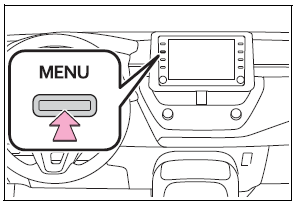
1 Press the “MENU” button.