
Toyota Corolla: Using the storage features / Trunk features
Toyota Corolla 2019-2026 Owners Manual / Interior features / Using the storage features / Trunk features
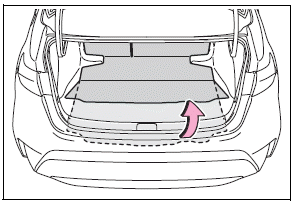
Auxiliary box
Lift the deck mat.
► Type A
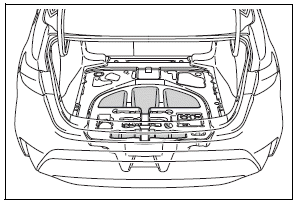
► Type B
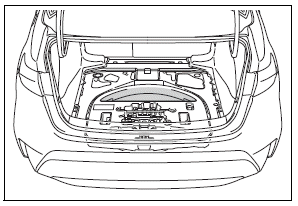


Other information:
Toyota Corolla 2019-2026 Owners Manual: Safety information for Safety Connect
Important! Read this information before using Safety Connect. ■ Exposure to radio frequency signals The Safety Connect system installed in your vehicle is a low-power radio transmitter and receiver. It receives and also sends out radio frequency (RF) signals. In August 1996, the Federal Communications Commission (FCC) adopted RF exposure guidelines with safety levels for mobile wireless phones..
Toyota Corolla 2019-2026 Owners Manual: Fastening and releasing the seat belt
1 To fasten the seat belt, push the plate into the buckle until a click sound is heard. 2 To release the seat belt, press the release button A. ■Emergency locking retractor (ELR) The retractor will lock the belt during a sudden stop or on impact. It may also lock if you lean forward too quickly. A slow, easy motion will allow the belt to extend so that you can move around fully. ■Automatic..
Categories
- Manuals Home
- 12th Generation Corolla Owners Manual
- General settings
- Alarm
- iMT (Intelligent Manual Transmission)
- New on site
- Most important about car
Unlocking and locking the doors from the outside
■ Smart key system (if equipped)
Carry the electronic key to enable this function.
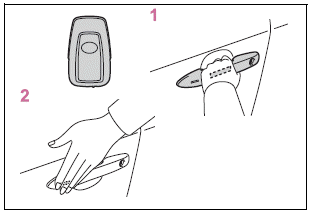
1 Grip the driver’s door handle to unlock the door. Holding the driver’s door handle for approximately 2 seconds unlocks all the doors. Grip the front passenger’s door handle to unlock all the doors.*

Copyright © 2026 www.tocorolla12.com