
Toyota Corolla: Doors / Unlocking and locking the doors from the inside
■ Door lock switches (to lock/unlock)
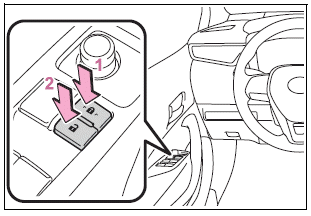
1 Locks all the doors<> 2 Unlocks all the doors
■ Inside lock buttons
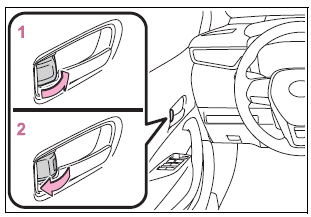
1 Locks the door
2 Unlocks the door
The front doors can be opened by pulling the inside handle even if the lock buttons are in the lock position.
■Locking the front doors from the outside without a key
1 Move the inside lock button to the lock position.
2 Close the door.
► Vehicles without a smart key system
The door cannot be locked if the key is in the engine switch.
► Vehicles with a smart key system
The door cannot be locked if the engine switch is in ACC or ON, or the electronic key is left inside the vehicle.
The key may not be detected correctly and the door may be locked.
■Open door warning buzzer
If a door or the trunk is not fully closed, a buzzer will sound when the vehicle speed reaches 3 mph (5 km/h).
The open door(s) or trunk is indicated on the multi-information display.
 Unlocking and locking the doors from the outside
■ Smart key system (if equipped)
Carry the electronic key to enable this function.
1 Grip the driver’s door handle to unlock the door. Holding the driver’s door
handle for approximately 2 seconds unlocks all the doors...
 Rear door child-protector lock
The door cannot be opened from inside the vehicle when lock is set.
1 Unlock
2 Lock
These locks can be set to prevent children from opening the rear doors...
Other information:
Toyota Corolla 2019-2026 Owners Manual: Hood
Opening the hood 1 Pull the hood lock release lever. The hood will pop up slightly. 2 Pull the auxiliary catch lever to the left and lift the hood. 3 Hold the hood open by inserting the support rod into the slot. WARNING ■ Pre-driving check Check that the hood is fully closed and locked...
Toyota Corolla 2019-2026 Owners Manual: LDA (Lane Departure Alert with steering control)
When driving on highways and freeways with white (yellow) lane lines, this function alerts the driver when the vehicle might depart from its lane or course* and provides assistance by operating the steering wheel to keep the vehicle in its lane or course*...
Categories
- Manuals Home
- 12th Generation Corolla Owners Manual
- Unlocking and locking the doors from the outside
- General settings
- Sensors
- New on site
- Most important about car
Using the interior lights. Interior lights list
Location of the interior lights
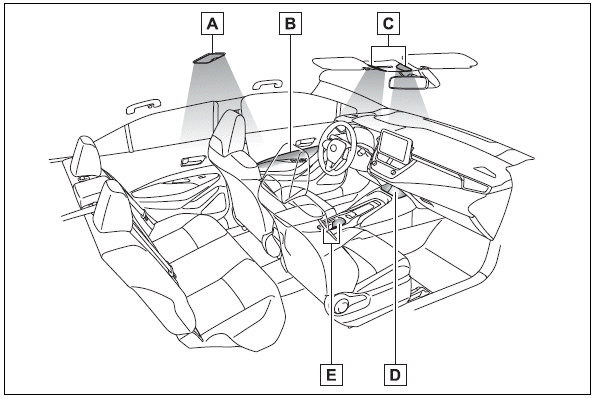
A - Rear interior light
B - Door trim lights
C - Front interior/personal lights
D - Center tray light
