
Toyota Corolla: Doors / Rear door child-protector lock
The door cannot be opened from inside the vehicle when lock is set.
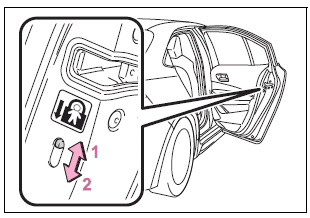
1 Unlock
2 Lock
These locks can be set to prevent children from opening the rear doors. Push down on each rear door switch to lock both rear doors.
 Unlocking and locking the doors from the inside
■ Door lock switches (to lock/unlock)
1 Locks all the doors<> 2 Unlocks all the doors
■ Inside lock buttons
1 Locks the door
2 Unlocks the door
The front doors can be opened by pulling the inside handle even if the lock buttons
are in the lock position...
 Automatic door locking and unlocking systems
The following functions can be set or canceled:
For instructions on customizing,
..
Other information:
Toyota Corolla 2019-2026 Owners Manual: Checking and adding the brake fluid
■ Checking fluid level The brake fluid level should be between the “MAX” and “MIN” lines on the tank. ■ Adding fluid 1 Slide and lift up the rubber strip to partly remove it as shown. 2 Disconnect the claws and remove the service cover. 3 Remove the reservoir cap. 4 Add brake fluid slowly while checking the fluid level. Make sure to check the fluid type and prepare the necessary it..
Toyota Corolla 2019-2026 Owners Manual: Settings display
■ Meter display settings that can be changed Language Select to change the language displayed. Units Select to change the units of measure displayed. Speedometer display (7-inch display) Select to set the display of the speedometer to analog/digital. Eco Driving Indicator Light (if equipped) Select to enable/disable the Eco Driving Indicator Light. l • Fuel economy display Selec..
Categories
- Manuals Home
- 12th Generation Corolla Owners Manual
- Transfer contacts from device
- PCS (Pre-Collision System)
- Unlocking and locking the doors from the outside
- New on site
- Most important about car
Unlocking and locking the doors from the outside
■ Smart key system (if equipped)
Carry the electronic key to enable this function.
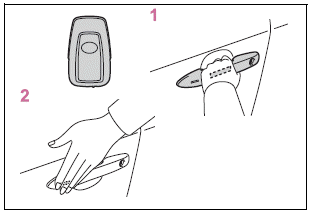
1 Grip the driver’s door handle to unlock the door. Holding the driver’s door handle for approximately 2 seconds unlocks all the doors. Grip the front passenger’s door handle to unlock all the doors.*

Copyright © 2026 www.tocorolla12.com