Toyota Corolla: Customization. Customizable features / Customizable features
Some function settings are changed simultaneously with other functions being customized. Contact your Toyota dealer for further details.
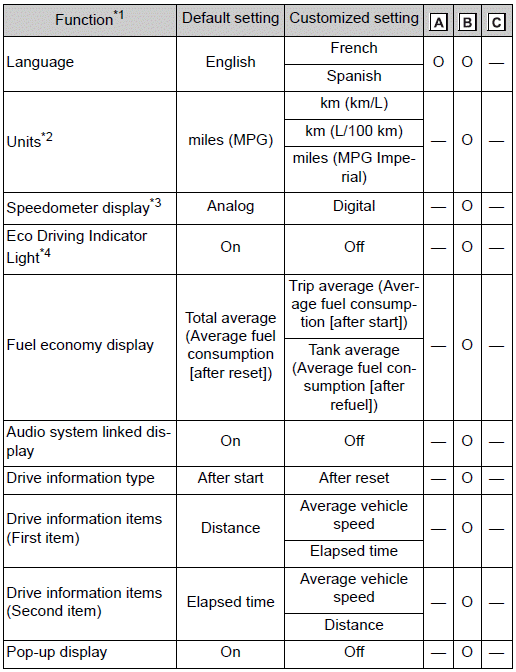
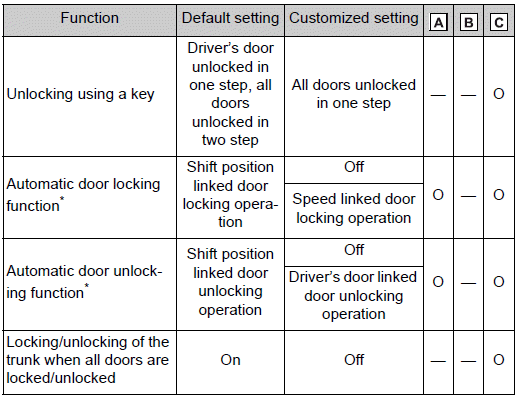
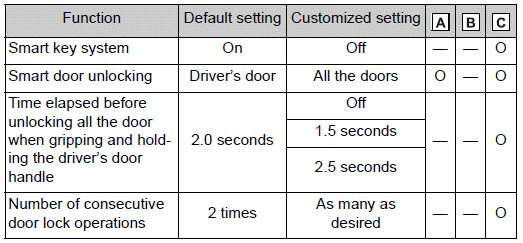
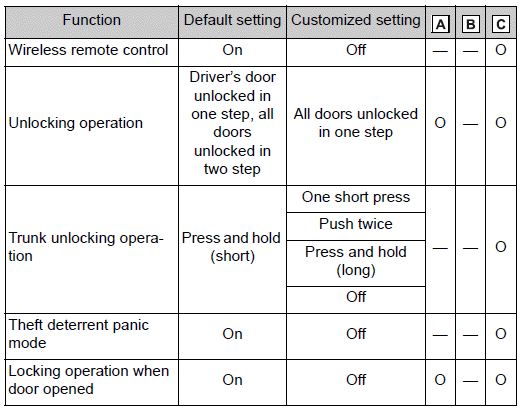
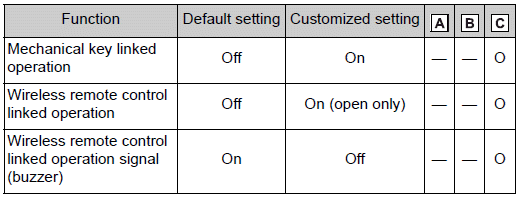
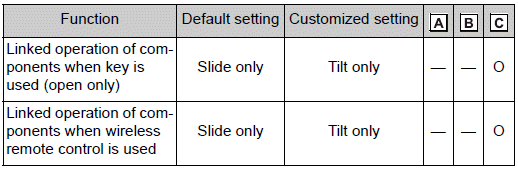
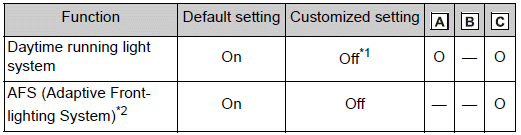
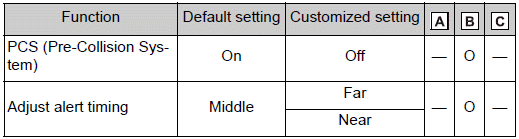
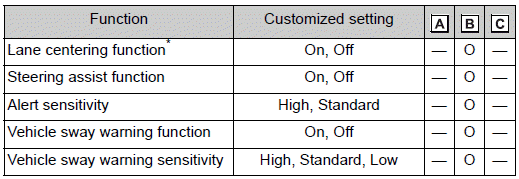
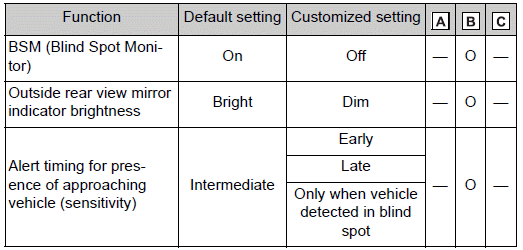
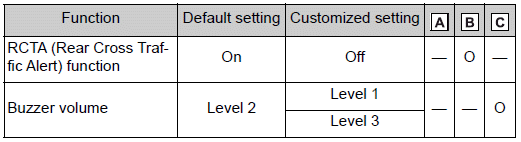
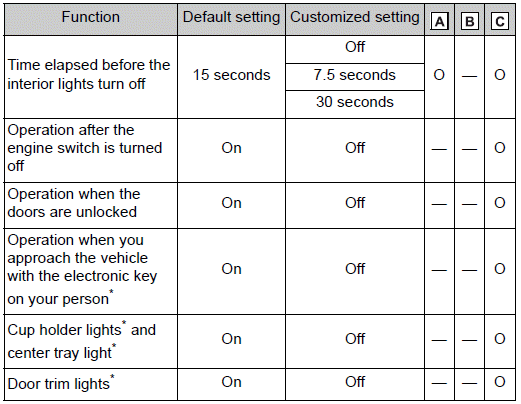
A - Settings that can be changed using the audio system screen
B - Settings that can be changed using the meter control switches
C - Settings that can be changed by your Toyota dealer
Definition of symbols: O = Available, — = Not available
■ Gauges, meters and multi-information display
■ Door lock
■ Smart key system* and wireless remote control
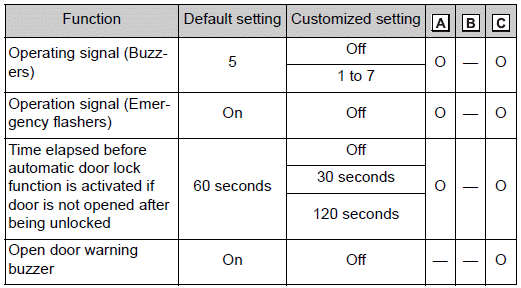
■ Smart key system
■ Wireless remote control
■ Power windows and moon roof
■ Moon roof
■ Automatic light control system
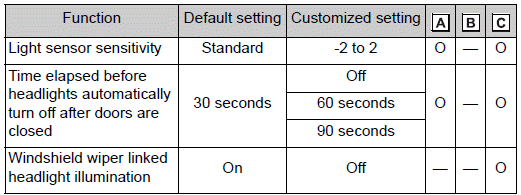
■ Lights
■ PCS (Pre-Collision System)
■ LTA (Lane Tracing Assist)*/LDA (Lane Departure Alert with steering control)
■ RSA (Road Sign Assist)

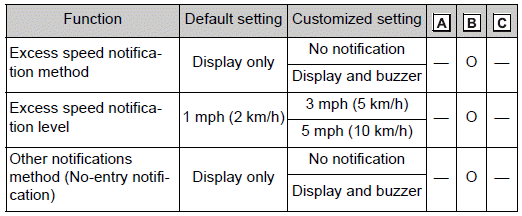
■ BSM (Blind Spot Monitor)
■ RCTA (Rear Cross Traffic Alert) function
■ Automatic air conditioning system

■ Illumination
■ Vehicle customization
- When the smart key system is off, Smart door unlocking cannot be customized.
- When the doors remain closed after unlocking the doors and the automatic door lock function is activated, the signals will be generated in accordance with the operation signal (buzzer) and the operation signal (emergency flashers) settings.
■ In the following situations, customize mode in which the settings can be changed through the multi-information display will automatically be turned off
- The engine switch is turned off.
- The vehicle begins to move while the customize mode screen is displayed.
 Customizing vehicle features
■ Changing by using the audio system screen
1 Press the “MENU” button.
2 Select “Setup” on the “Menu” screen.
3 Select “General” or “Vehicle” on the “Setup” screen...
 Initialization. Items to initialize
The following items must be initialized for normal system operation after such
cases as the battery being reconnected, or maintenance being performed on the vehicle:
List of items to initialize
..
Other information:
Toyota Corolla 2019-2026 Owners Manual: Changing the engine switch positions
1 OFF (“LOCK” position) The steering wheel is locked and the key can be removed. (vehicles with a continuously variable transmission: The key can be removed only when the shift lever is in P.) 2 ACC (“ACC” position) Some electrical components such as the audio system can be used. 3 ON ( “ON” position) All electrical components can be used. 4 START ( “START” position) For starting..
Toyota Corolla 2019-2026 Owners Manual: Checking and replacing fuses
If any of the electrical components do not operate, a fuse may have blown. If this happens, check and replace the fuses as necessary. Checking and replacing fuses 1 Turn the engine switch off. 2 Open the fuse box cover. ► Engine compartment: type A fuse box Push the tabs in and lift the lid off. ► Engine compartment: type B fuse box Push the tabs in and lift the lid off. ► Under the drive..
Categories
- Manuals Home
- 12th Generation Corolla Owners Manual
- Unlocking and locking the doors from the outside
- iMT (Intelligent Manual Transmission)
- Interior features
- New on site
- Most important about car
Engine immobilizer system
The vehicle’s keys have built-in transponder chips that prevent the engine from starting if a key has not been previously registered in the vehicle’s on-board computer.
Never leave the keys inside the vehicle when you leave the vehicle.
This system is designed to help prevent vehicle theft but does not guarantee absolute security against all vehicle thefts.
Operating the system