Toyota Corolla: Phone operation (Hands-free system for cellular phones) / Quick reference
Phone screen operation
The phone screen can be reached by the following methods:
► From the “PHONE” button
Press the “PHONE” button.
► From the “MENU” button
Press the “MENU” button, then select “Phone”.
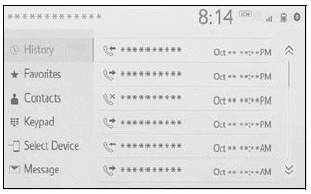
Bluetooth® hands-free system operation
The following functions can be used on phone operation:
- Registering/connecting a Bluetooth® device
- Placing a call using the Bluetooth ® hands-free system
- Receiving a call using the Bluetooth® hands-free system
- Talking on the Bluetooth® hands-free system
Message function
The following function can be used on message function:
Using the Bluetooth® phone message function
Setting up a phone
The following functions can be made in the system:
- Phone settings
- Bluetooth® settings

 Some basics
The hands-free system enables calls to be made and received without having to
take your hands off the steering wheel.
This system supports Bluetooth ®...
Other information:
Toyota Corolla 2019-2026 Owners Manual: If the vehicle is trapped in rising water
In the event the vehicle is submerged in water, remain calm and perform the following. Remove the seat belt first. If the door can be opened, open the door and exit the vehicle. If the door can not be opened, open the window using the power window switch and exit the vehicle through the window...
Toyota Corolla 2019-2026 Owners Manual: Using an anchor bracket (for top tether strap)
■ Anchor brackets (for top tether strap) Anchor brackets are provided for each rear seat. Use anchor brackets when fixing the top tether strap. ► Seats with an adjustable type head restraint A - Anchor brackets<> B - Top tether strap ► Seats with an integrated type head restraint A - Anchor brackets<> B - Top tether strap ■ Fixing the top tether strap to the anchor bracket In..
Categories
- Manuals Home
- 12th Generation Corolla Owners Manual
- Odometer and trip meter display
- Electric parking brake
- Sound settings
- New on site
- Most important about car
Engine immobilizer system
The vehicle’s keys have built-in transponder chips that prevent the engine from starting if a key has not been previously registered in the vehicle’s on-board computer.
Never leave the keys inside the vehicle when you leave the vehicle.
This system is designed to help prevent vehicle theft but does not guarantee absolute security against all vehicle thefts.
Operating the system