
Toyota Corolla: Audio
- Basic function
- Basic information before operation
- Initial screen
- Touch screen
- Home screen
- Entering letters and numbers/ list screen operation
- Screen adjustment
- Linking multi-information display and the system
- Connectivity settings
- Registering/Connecting a Bluetooth® device
- Setting Bluetooth® details
- Wi-Fi® Hotspot
- Apple CarPlay/ Android Auto
- Other settings
- Using the audio/visual system. Quick reference
- Using the audio/visual system. Some basics
- Turning the system on and off. Selecting an audio source
- Reordering the audio source. USB port
- Sound settings
- Audio screen adjustment. Voice command system
- Radio operation. AM radio/FM radio/SiriusXM ® Satellite Radio(SXM)
- Presetting a station. Selecting a station from the list
- Radio Broadcast Data System
- How to subscribe to SiriusXM Radio Services
- Displaying the radio ID
- Refer to the table below to identify the problem and take the suggested corrective action
- Radio operation. Internet radio
- Media operation
- Audio/visual remote controls. Steering switches
- Audio settings. Setup
- Tips for operating the audio/visual system. Operating information
- Voice command system operation. Voice command system
- Voice command system operation. Command list
- Mobile Assistant operation. Mobile Assistant
- Phone operation (Hands-free system for cellular phones)
- Quick reference
- Some basics
- Registering/Connecting a Bluetooth® phone
- Using the phone switch/microphone
- Voice command system
- About the contacts in the contact list
- When selling or disposing of the vehicle
- Placing a call using the Bluetooth® hands-free system
- Receiving a call using the Bluetooth® hands-free system
- Talking on the Bluetooth® hands-free system
- Bluetooth® phone message function
- Phone settings. Setup
- Phone settings screen. Sounds settings screen
- Notifications settings screen
- Contacts/Call history settings screen
- Setting automatic contact/ history transfer
- Transfer contacts from device
- Registering a new contact to the contacts list
- Editing & Deleting the contact data
- Favorites list setting
- Setting voice tags
- Message settings screen
- Vehicle signature settings
- What to do if... (Bluetooth ®). Troubleshooting
- Connected Services Overview
- Functional overview
- Type A: Function achieved by using a smart phone or DCM
- Type B: Function achieved by using DCM and the system
- Type C: Function achieved by using DCM
- Type D: Function achieved by using DCM and a smartphone
- Connected Services Operation. Toyota apps
- Toyota apps settings. Setup
 Winter driving tips
Carry out the necessary preparations and inspections before driving the vehicle
in winter. Always drive the vehicle in a manner appropriate to the prevailing weather
conditions...

Other information:
Toyota Corolla 2019-2026 Owners Manual: iPod
■ Certification Use of the Made for Apple badge means that an accessory has been designed to connect specifically to the Apple product(s) identified in the badge, and has been certified by the developer to meet Apple performance standards. Apple is not responsible for the operation of this device or its compliance with safety and regulatory standards. Please note that the use of this ..
Toyota Corolla 2019-2026 Owners Manual: Contacts/Call history settings screen
Contacts can be transferred from a Bluetooth® phone to this system. Contacts and favorites can be added, edited and deleted. Also, the call history can be deleted. 1 Display the phone settings screen. 2 Select “Contacts/Call History”. 3 Select the desired item to be set. A - For PBAP compatible Bluetooth ® phones: Select to change the contact/history transfer settings. B - Select to updat..
Categories
- Manuals Home
- 12th Generation Corolla Owners Manual
- Lubrication system (1.8 L 4-cylinder [2ZR-FAE] engine)
- Air conditioning controls
- Electric parking brake
- New on site
- Most important about car
iMT (Intelligent Manual Transmission)
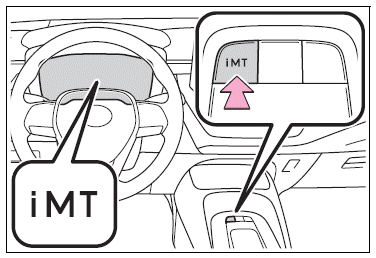
The iMT optimally controls the engine speed to suit the driver’s operation of the clutch pedal and shift lever, helping the driver to shift gears more smoothly. Additionally, when the clutch pedal is operated, the iMT helps reduce shift shock, allowing for lighter shift operations when driving on a winding road or incline.
Press the “iMT” switch.

Copyright © 2026 www.tocorolla12.com