
Toyota Corolla: Vehicle specifications / Specifications
Toyota Corolla 2019-2026 Owners Manual / Vehicle specifications / Specifications

 Maintenance data (fuel, oil level, etc.)
Dimensions and weight
Seating capacity
Seating capacity 5 (Front 2, Rear 3)..
Other information:
Toyota Corolla 2019-2026 Owners Manual: Power windows
Opening and closing the power windows The power windows can be opened and closed using the switches. Operating the switch moves the windows as follows: 1 Closing<> 2 One-touch closing*<> 3 Opening<> 4 One-touch opening* ■The power windows can be operated when The engine switch is in ON. ■Operating the power windows after turning the engine off The power windows can be operat..
Toyota Corolla 2019-2026 Owners Manual: Bluetooth® audio
The Bluetooth® audio system enables users to enjoy listening to music that is played on a portable player on the vehicle speakers via wireless communication. This audio/visual system supports Bluetooth®, a wireless data system capable of playing portable audio music without cables. If your device does not support Bluetooth®, the Bluetooth ® audio system will not function. Depending on the..
Categories
- Manuals Home
- 12th Generation Corolla Owners Manual
- Sound settings
- Changing settings of the pre-collision system
- Driving mode select switch
- New on site
- Most important about car
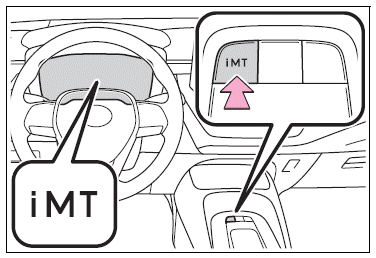
iMT (Intelligent Manual Transmission)
The iMT optimally controls the engine speed to suit the driver’s operation of the clutch pedal and shift lever, helping the driver to shift gears more smoothly. Additionally, when the clutch pedal is operated, the iMT helps reduce shift shock, allowing for lighter shift operations when driving on a winding road or incline.
Press the “iMT” switch.

Copyright © 2026 www.tocorolla12.com