
Toyota Corolla: Specifications / Maintenance data (fuel, oil level, etc.)
Toyota Corolla 2019-2026 Owners Manual / Vehicle specifications / Specifications / Maintenance data (fuel, oil level, etc.)
Dimensions and weight
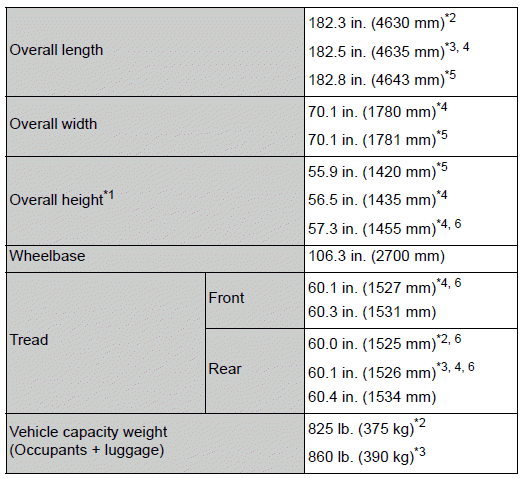
Seating capacity
Seating capacity 5 (Front 2, Rear 3)
- Vehicle identification
- Engine & Fuel
- Lubrication system (1.8 L 4-cylinder [2ZR-FAE] engine)
- Lubrication system (2.0 L 4-cylinder [M20A-FKS] engine)
- Cooling system
- Ignition system (spark plug)
- Electrical system (battery)
- Continuously variable transmission
- Manual transmission
- Clutch & Brakes
- Steering & Tires and wheels
- Light bulbs

 Vehicle identification
■ Vehicle identification number
The vehicle identification number (VIN) is the legal identifier for your vehicle.
This is the primary identification number for your Toyota...
Other information:
Toyota Corolla 2019-2026 Owners Manual: Indications on multi-information display
A - LTA indicator The illumination condition of the indicator informs the driver of the system operation status. Illuminated in white: LTA system is operating. Illuminated in green: Steering wheel assistance of the steering assist function or lane centering function is operating...
Toyota Corolla 2019-2026 Owners Manual: Replacing light bulbs
■ Front turn signal/parking lights (vehicles without side turn signal lights) 1 Turn the bulb base counterclockwise. Type A Type B 2 Remove the light bulb. Type A Type B 3 When installing, reverse the steps listed. ■ Front side marker lights 1 Turn the bulb base counterclockwise...
Categories
- Manuals Home
- 12th Generation Corolla Owners Manual
- Interior features
- Changing settings of the pre-collision system
- Air conditioning controls
- New on site
- Most important about car
Gauges and meters (4.2-inch display)
Meter display
■ Locations of gauges and meters
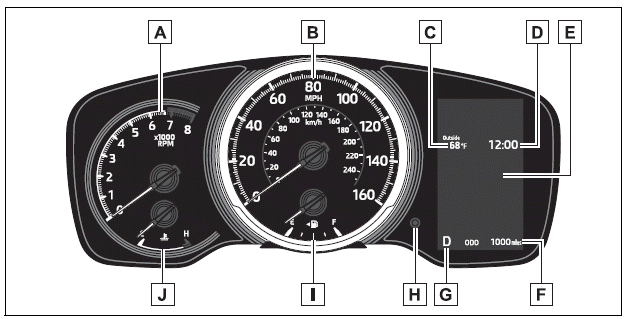
The units of measure may differ depending on the intended destination of the vehicle.
A - Tachometer Displays the engine speed in revolutions per minute

Copyright © 2026 www.tocorolla12.com