
Toyota Corolla: Tire information / Tire section names
Toyota Corolla 2019-2026 Owners Manual / Vehicle specifications / Specifications / Tire information / Tire section names
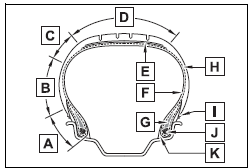
A - Bead
B - Sidewall
C - Shoulder
D - Tread
E - Belt
F - Inner liner
G - Reinforcing rubber
H - Carcass
I - Rim lines
J - Bead wires
K - Chafer
 Tire size
â..
 Uniform Tire Quality Grading
This information has been prepared in accordance with regulations issued by the
National Highway Traffic Safety Administration of the U.S. Department of Transportation...
Other information:
Toyota Corolla 2019-2026 Owners Manual: SRS airbags
The SRS airbags inflate when the vehicle is subjected to certain types of severe impacts that may cause significant injury to the occupants. They work together with the seat belts to help reduce the risk of death or serious injury. SRS airbag system ■ Location of the SRS airbags SRS front airbags A - SRS driver airbag/front passenger airbag<> Can help protect the head and chest of the ..
Toyota Corolla 2019-2026 Owners Manual: Mobile Assistant operation. Mobile Assistant
The Mobile Assistant function is a voice input assist function. Mobile Assist supports the Siri Eyes Free Mode and Google App. (Google App can be used only with the corresponding device.) Instructions can be spoken into the vehicle microphone as if speaking a command to the phone. The content of the request is then interpreted by the phone and the result is output from the vehicle speakers. To..
Categories
- Manuals Home
- 12th Generation Corolla Owners Manual
- Unlocking and locking the doors from the outside
- Changing settings of the pre-collision system
- Driving mode select switch
- New on site
- Most important about car
Operating HomeLink
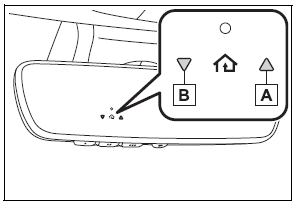
Press the appropriate Home- Link® button. The HomeLink® indicator light should turn on.
The status of the opening and closing of a garage door is shown by the indicators.

Copyright © 2026 www.tocorolla12.com