
Toyota Corolla: Other interior features / Garage door opener
Toyota Corolla 2019-2026 Owners Manual / Interior features / Other interior features / Garage door opener
The garage door opener can be programmed using the HomeLink® to operate garage doors, gates, entry doors, door locks, home lighting systems, security systems, and other devices.
- System components
- Programming the Home- Link
- Operating HomeLink
- Erasing the entire Home- Link® memory (all three codes)
 Coat hooks
The coat hooks are provided with the rear assist grips.
WARNING
■ Items that cannot be hung on the coat hook
Do not hang coat hangers or other hard or sharp objects on the hook...
 System components
The HomeLink® wireless control system in your vehicle has 3 buttons which can
be programmed to operate 3 different devices. Refer to the programming methods on
the following pages to determine the method which is appropriate for the device...
Other information:
Toyota Corolla 2019-2026 Owners Manual: Audio screen adjustment. Voice command system
Audio screen adjustment ■ Screen format settings The screen format can be selected for USB video. 1 Press the “MENU” button. 2 Select “Setup”. 3 Select “Audio”. 4 Select “Common”. 5 Select “Screen Format”. 6 Select the desired item to be adjusted...
Toyota Corolla 2019-2026 Owners Manual: Consumption
■ Trip information ► Audio without DCM/Audio Plus without DCM 1 Press the “MENU” button. 2 Select “Info” on the “Menu” screen. If a screen other than “Trip Information” is displayed, select “Trip Information”. ► Audio with DCM/Audio Plus with DCM/Premium Audio 1 Press the “MENU” button...
Categories
- Manuals Home
- 12th Generation Corolla Owners Manual
- Alarm
- Lubrication system (2.0 L 4-cylinder [M20A-FKS] engine)
- Air conditioning controls
- New on site
- Most important about car
Screen adjustment
The contrast and brightness of the screen display and the image of the camera display can be adjusted. The screen can also be turned off, and/or changed to either day or night mode.
(For information regarding audio/visual screen adjustment)
Displaying the screen adjustment screen
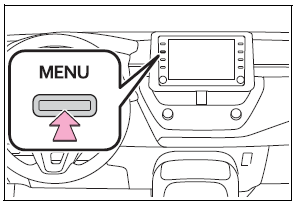
1 Press the “MENU” button.

Copyright © 2026 www.tocorolla12.com