
Toyota Corolla: Garage door opener / Erasing the entire Home- Link® memory (all three codes)
Toyota Corolla 2019-2025 Owners Manual / Interior features / Other interior features / Garage door opener / Erasing the entire Home- Link® memory (all three
codes)
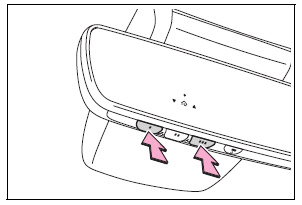
Press and hold the 2 outside buttons for 10 seconds until the HomeLink® indicator light changes from continuously lit (orange) to rapidly flashing (green).
If you sell your vehicle, be sure to erase the programs stored in the HomeLink® memory.
 Operating HomeLink
Press the appropriate Home- Link® button. The HomeLink®
indicator light should turn on.
The status of the opening and closing of a garage
door is shown by the indicators...

Other information:
Toyota Corolla 2019-2025 Owners Manual: Favorites list setting
Up to 15 contacts (maximum of 4 numbers per contact) can be registered in the favorites list. ■ Registering the contacts in the favorites list 1 Select “Add Favorite”. 2 Select the desired contact to add to the favorites list. Dimmed contacts are already stored as a favorite. 3 Check that a confirmation screen is displayed when the operation is complete. ► When 15 contacts have already be..
Toyota Corolla 2019-2025 Owners Manual: iPod/iPhone (Apple Car- Play)
Overview When an Android Auto connection is established, this function will be unavailable. Control screen ► An Apple CarPlay connection is not established ► An Apple CarPlay connection is established A - Select to display the audio source selection screen. B - Select to return to the top screen. C - Select to display a song list screen. D - Select to display the play mode selection screen. ..
Categories
- Manuals Home
- 12th Generation Corolla Owners Manual
- General settings
- Operating HomeLink
- Alarm
- New on site
- Most important about car
Gauges and meters (4.2-inch display)
Meter display
■ Locations of gauges and meters
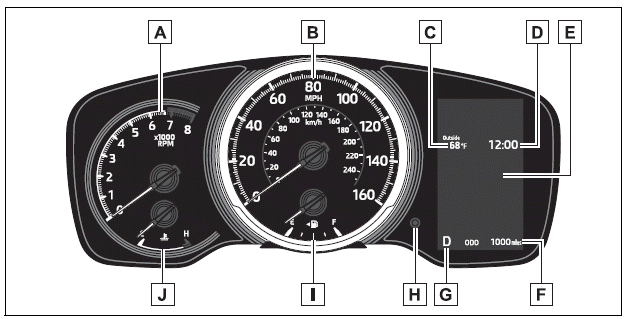
The units of measure may differ depending on the intended destination of the vehicle.
A - Tachometer Displays the engine speed in revolutions per minute

Copyright © 2025 www.tocorolla12.com