
Toyota Corolla: Using the air conditioning system and defogger / Manual air conditioning system
Toyota Corolla 2019-2026 Owners Manual / Interior features / Using the air conditioning system and defogger / Manual air conditioning system

 Air conditioning controls
The display and button positions will differ depending on the type of the system.
A - Fan speed control switch
B - Temperature control switch
C - “MAX A/C” switch
D - “A/C” switch
E - Outside air mode switch
F - Recirculated air mode switch
G - Airflow mode control switch
H - Rear window defogger and outside rear view mirror defoggers switch
I - Windshield defogger switch
J - On/off switc..
Other information:
Toyota Corolla 2019-2026 Owners Manual: Emergency tire puncture repair kit components
► Bottle A - Hose B - Air release cap C - Sticker ► Compressor A - Power plug B - Rubber stopper C - Air pressure gauge D - Compressor switch ■ Note for checking the emergency tire puncture repair kit Check the sealant expiry date occasionally. The expiry date is shown on the bottle. Do not use sealant whose expiry date has already passed. Otherwise, repairs conducted using the emergency ..
Toyota Corolla 2019-2026 Owners Manual: Changing the engine switch positions
1 OFF (“LOCK” position) The steering wheel is locked and the key can be removed. (vehicles with a continuously variable transmission: The key can be removed only when the shift lever is in P.) 2 ACC (“ACC” position) Some electrical components such as the audio system can be used. 3 ON ( “ON” position) All electrical components can be used. 4 START ( “START” position) For starting..
Categories
- Manuals Home
- 12th Generation Corolla Owners Manual
- Engine immobilizer system
- Interior features
- Operating instructions
- New on site
- Most important about car
SRS airbags
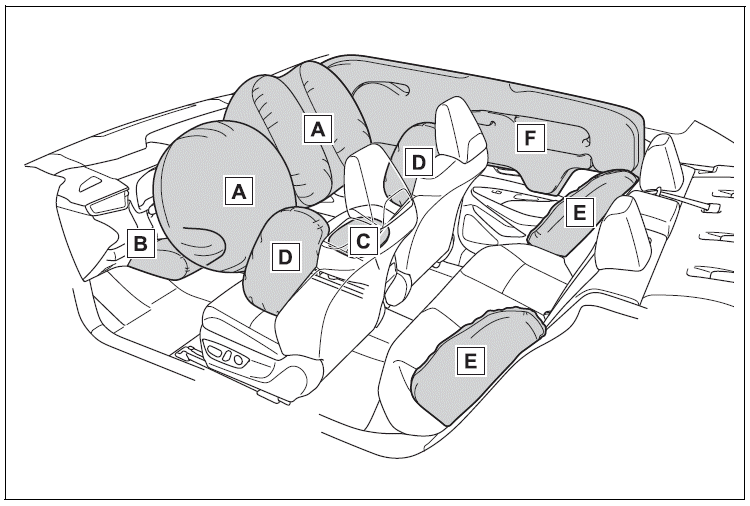
The SRS airbags inflate when the vehicle is subjected to certain types of severe impacts that may cause significant injury to the occupants. They work together with the seat belts to help reduce the risk of death or serious injury.
SRS airbag system
■ Location of the SRS airbags

Copyright © 2026 www.tocorolla12.com