Toyota Corolla: If you have a flat tire (vehicles with a spare tire) / Replacing a flat tire
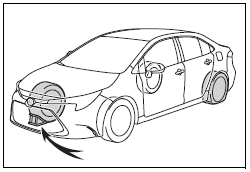
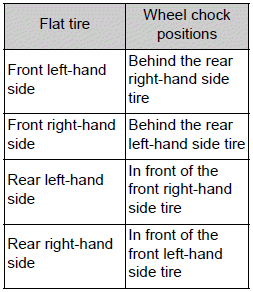
1 Chock the tires.
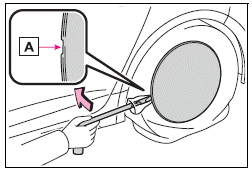
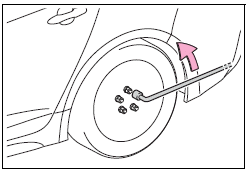
2 Vehicles with a steel wheel: Remove the wheel ornament (if equipped) using the wrench.
Insert the wrench into the notch A on the wheel cap. To protect the wheel ornament, place a rag between the wrench and the wheel ornament.
3 Slightly loosen the wheel nuts (one turn).
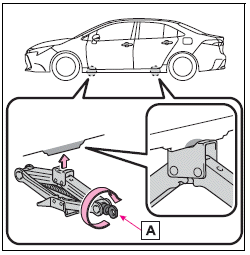
4 Turn the tire jack portion A by hand until the center of the recessed portion of the jack is in contact with the center of the jack point.
5 Assemble the jack handle extension.
► Type A
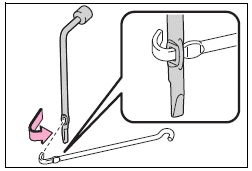
► Type B
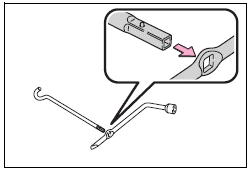
6 Raise the vehicle until the tire is slightly raised off the ground.
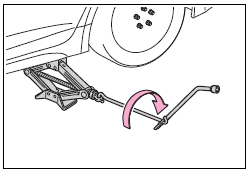
7 Remove all the wheel nuts and the tire.
When resting the tire on the ground, place the tire so that the wheel design faces up to avoid scratching the wheel surface.

WARNING
■ Replacing a flat tire
- Do not touch the disc wheels or the area around the brakes immediately after the vehicle has been driven. After the vehicle has been driven the disc wheels and the area around the brakes will be extremely hot. Touching these areas with hands, feet or other body parts while changing a tire, etc. may result in burns.
- Failure to follow these precautions could cause the wheel nuts to loosen
and the tire to fall off, resulting in death or serious injury.
- Have the wheel nuts tightened with a torque wrench to 76 ft•lbf (103 N•m, 10.5 kgf•m) as soon as possible after changing wheels.
- Do not attach a heavily damaged wheel ornament, as it may fly off the wheel while the vehicle is moving.
- When installing a tire, only use wheel nuts that have been specifically designed for that wheel.
- If there are any cracks or deformations in the bolt screws, nut threads or bolt holes of the wheel, have the vehicle inspected by your Toyota dealer.
- When installing the wheel nuts, be sure to install them with the tapered ends facing inward.
 Taking out the spare tire
1 Remove the deck mat.
2 Remove the tool tray.
3 Loosen the center fastener that secures the spare tire.
WARNING
■ When storing the spare tire
Be careful not to catch fingers or other body parts between the spare tire
and the body of the vehicle...
 Installing the spare tire
1 Remove any dirt or foreign matter from the wheel contact surface.
If foreign matter is on the wheel contact surface, the wheel nuts may loosen
while the vehicle is in motion, causing the tire to come off...
Other information:
Toyota Corolla 2019-2026 Owners Manual: Status icon
Status icons are displayed at the top of the screen. Status icon explanation A - Indicate during data communication performed via Data Communication Module B - The reception level of Data Communication Module (DCM) display C - The reception level of the connected phone display D - Remaining battery charge display E - Bluetooth® phone connection condition display F - Wi-Fi® connection conditio..
Toyota Corolla 2019-2026 Owners Manual: Message settings screen
1 Display the phone settings screen. 2 Select “Messaging”. 3 Select the desired item to be set. A - Select to set automatic message transfer on/off. B - Select to set automatic message readout on/off. C - Select to set updating message read status on phone on/off. D - Select to set display of messaging account names on the message screen on/off. When set to on, messaging account names used o..
Categories
- Manuals Home
- 12th Generation Corolla Owners Manual
- Sound settings
- Fuel information
- Sensors
- New on site
- Most important about car
iMT (Intelligent Manual Transmission)
The iMT optimally controls the engine speed to suit the driver’s operation of the clutch pedal and shift lever, helping the driver to shift gears more smoothly. Additionally, when the clutch pedal is operated, the iMT helps reduce shift shock, allowing for lighter shift operations when driving on a winding road or incline.
Press the “iMT” switch.