
Toyota Corolla: When trouble arises
Toyota Corolla 2019-2026 Owners Manual / When trouble arises
- Essential information
- Emergency flashers
- If your vehicle has to be stopped in an emergency
- If the vehicle is trapped in rising water
- Steps to take in an emergency
- If your vehicle needs to be towed
- If you think something is wrong
- Fuel pump shut off system
- If a warning light turns on or a warning buzzer sounds
- If a warning message is displayed
- If you have a flat tire (vehicles without spare tire)
- If you have a flat tire (vehicles with a spare tire)
- If the engine will not start
- If you lose your keys
- If the electronic key does not operate properly
- If the vehicle battery is discharged
- If your vehicle overheats
- If the vehicle becomes stuck
 Replacing light bulbs
■ Front turn signal/parking lights (vehicles without side turn signal lights)
1 Turn the bulb base counterclockwise.
Type A
Type B
2 Remove the light bulb...

Other information:
Toyota Corolla 2019-2026 Owners Manual: Setting automatic contact/ history transfer
The automatic contact/history function is available for PBAP compatible Bluetooth® phones only. 1 Select “Automatic Transfer”. 2 Select the desired item to be set. A - Select to set automatic contact/ history transfer on/off. When set to on, the phone’s contact data and history are automatically transferred. B - Select to update contacts from the connected phone. C - Select to set the tr..
Toyota Corolla 2019-2026 Owners Manual: Error messages
■ USB ■ iPod ■ Bluetooth® audio If the malfunction is not rectified: Take your vehicle to your Toyota dealer...
Categories
- Manuals Home
- 12th Generation Corolla Owners Manual
- Opening the trunk
- Engine immobilizer system
- Odometer and trip meter display
- New on site
- Most important about car
Operating HomeLink
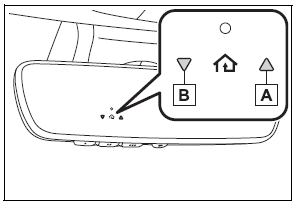
Press the appropriate Home- Link® button. The HomeLink® indicator light should turn on.
The status of the opening and closing of a garage door is shown by the indicators.

Copyright © 2026 www.tocorolla12.com