
Toyota Corolla: Basic function / “Setup” screen
“Setup” screen
Press the “MENU” button, then select “Setup” to display the “Setup” screen. The items shown on the “Setup” screen can be set.
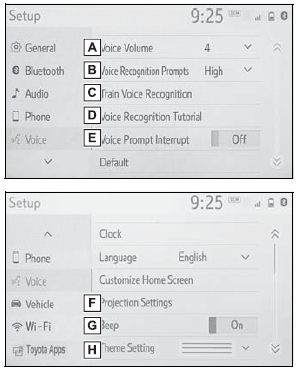
A - Select to change the selected language, operation sound settings, etc.
B - Select to set Bluetooth® device and Bluetooth® system settings.
C - Select to set audio settings.
D - Select to set the phone sound, contacts, message settings, etc.
E - Select to set the voice settings.
F - Select to set vehicle information.
G - Select to set Wi-Fi® connection settings.
H - Select to set Toyota apps settings.
 Status icon
S..

Other information:
Toyota Corolla 2019-2026 Owners Manual: Air conditioning filter
The air conditioning filter must be changed regularly to maintain air conditioning efficiency. Removing the air conditioning filter 1 Turn the engine switch off. 2 Open the glove box. Slide off the damper (if equipped). 3 Push in the glove box on the vehicle’s outer side to disconnect the claws. Then pull out the glove box and disconnect the lower claws. 4 Unlock the filter cover (A), pull t..
Toyota Corolla 2019-2026 Owners Manual: Safety information for Safety Connect
Important! Read this information before using Safety Connect. ■ Exposure to radio frequency signals The Safety Connect system installed in your vehicle is a low-power radio transmitter and receiver. It receives and also sends out radio frequency (RF) signals. In August 1996, the Federal Communications Commission (FCC) adopted RF exposure guidelines with safety levels for mobile wireless phones..
Categories
- Manuals Home
- 12th Generation Corolla Owners Manual
- General settings
- Air conditioning controls
- Unlocking and locking the doors from the outside
- New on site
- Most important about car
Using the interior lights. Interior lights list
Location of the interior lights
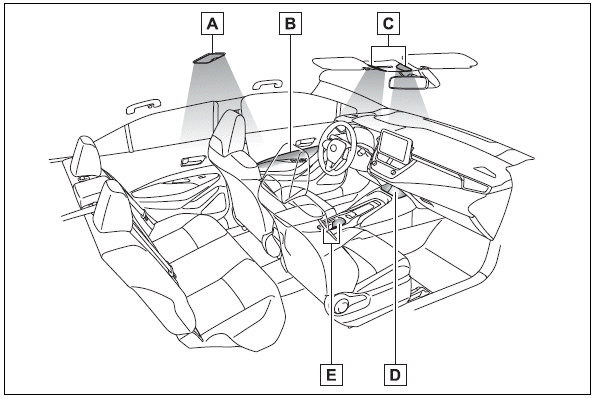
A - Rear interior light
B - Door trim lights
C - Front interior/personal lights
D - Center tray light

Copyright © 2026 www.tocorolla12.com