
Toyota Corolla: Audio / Connectivity settings
Toyota Corolla 2019-2026 Owners Manual / Audio / Connectivity settings
- Registering/Connecting a Bluetooth® device
- Setting Bluetooth® details
- Wi-Fi® Hotspot
- Apple CarPlay/ Android Auto
 Linking multi-information display and the system
The following functions of the system are linked with the multi-information display
in the instrument cluster:
Audio
Phone*
These functions can be operated using multi-information display control switches
on the steering wheel...
 Registering/Connecting a Bluetooth® device
To use the hands-free system, it is necessary to register a Bluetooth® phone
with the system.
Once the phone has been registered, it is possible to use the hands-free system...
Other information:
Toyota Corolla 2019-2026 Owners Manual: Consumption
■ Trip information ► Audio without DCM/Audio Plus without DCM 1 Press the “MENU” button. 2 Select “Info” on the “Menu” screen. If a screen other than “Trip Information” is displayed, select “Trip Information”. ► Audio with DCM/Audio Plus with DCM/Premium Audio 1 Press the “MENU” button...
Toyota Corolla 2019-2026 Owners Manual: Using the audio/visual system. Quick reference
Functional overview The audio control screen can be reached by the following methods: u From the “AUDIO” button Press the “AUDIO” button. u From the “MENU” button Press the “MENU” button, then select “Audio”. Using the radio Playing a USB memory Playing an iPod/iPhone (Apple CarPlay*) Using the Android Auto Playing a Bluetooth® device Using the steering wheel audio swi..
Categories
- Manuals Home
- 12th Generation Corolla Owners Manual
- Transfer contacts from device
- Sound settings
- Unlocking and locking the doors from the outside
- New on site
- Most important about car
SRS airbags
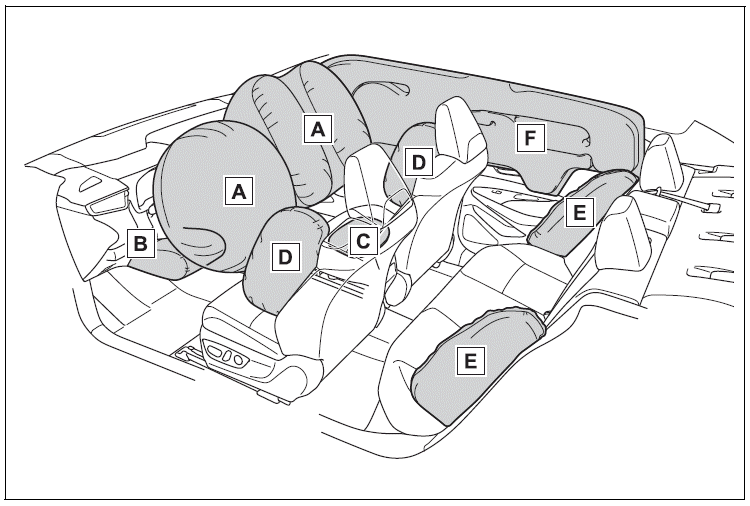
The SRS airbags inflate when the vehicle is subjected to certain types of severe impacts that may cause significant injury to the occupants. They work together with the seat belts to help reduce the risk of death or serious injury.
SRS airbag system
■ Location of the SRS airbags

Copyright © 2026 www.tocorolla12.com