
Toyota Corolla: For safety and security / Emergency assistance
Toyota Corolla 2019-2026 Owners Manual / For safety and security / Emergency assistance

 Safety Connect
Safety Connect is a subscription- based telematics service that uses Global Positioning
System (GPS) data and embedded cellular technology to provide safety and security
features to subscribers...
Other information:
Toyota Corolla 2019-2026 Owners Manual: Steering wheel
Adjustment procedure 1 Hold the steering wheel and push the lever down. 2 Adjust to the ideal position by moving the steering wheel horizontally and vertically. After adjustment, pull the lever up to secure the steering wheel. WARNING ■Caution while driving Do not adjust the steering wheel while driving...
Toyota Corolla 2019-2026 Owners Manual: Stopping the engine
► Continuously variable transmission 1 Stop the vehicle completely. 2 Set the parking brake (®P.180, 181), and shift the shift lever to P. Check the parking brake indicator is illuminated. 3 Press the engine switch. The engine will stop, and the meter display will be extinguished...
Categories
- Manuals Home
- 12th Generation Corolla Owners Manual
- Unlocking and locking the doors from the outside
- Electric parking brake
- General settings
- New on site
- Most important about car
Screen adjustment
The contrast and brightness of the screen display and the image of the camera display can be adjusted. The screen can also be turned off, and/or changed to either day or night mode.
(For information regarding audio/visual screen adjustment)
Displaying the screen adjustment screen
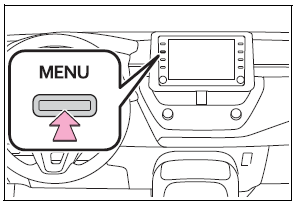
1 Press the “MENU” button.

Copyright © 2026 www.tocorolla12.com