
Toyota Corolla: Maintenance data (fuel, oil level, etc.) / Engine & Fuel
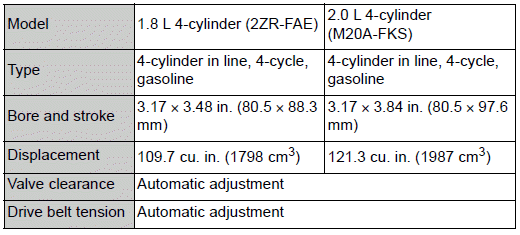
Engine
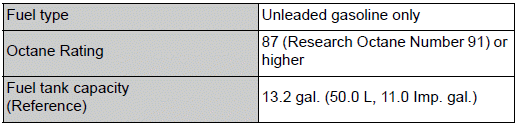
Fuel
 Vehicle identification
■ Vehicle identification number
The vehicle identification number (VIN) is the legal identifier for your vehicle.
This is the primary identification number for your Toyota...
 Lubrication system (1.8 L 4-cylinder [2ZR-FAE] engine)
■ Oil capacity (Drain and refill [Reference*])
The engine oil capacity is a reference quantity to be used when changing the
engine oil. Warm up and turn off the engine, wait more than 5 minutes, and check
the oil level on the dipstick...
Other information:
Toyota Corolla 2019-2026 Owners Manual: Preparing for light bulb replacement
Check the wattage of the light bulb to be replaced. Bulb locations ■ Front A - Front side marker lights B - Front turn signal/parking lights (vehicles without side turn signal lights) ■ Rear A - Back-up lights B - Rear turn signal lights C - Rear side marker lights (bulb type) ■ Bulbs that need to be replaced by your Toyota dealer Headlights/daytime running lights Parking lights (vehicl..
Toyota Corolla 2019-2026 Owners Manual: Rear seats
The seatbacks of the rear seats can be folded down. Folding down the rear seatbacks 1 Move the front seats forward. (®P.133) 2 Stow the rear armrest. (if equipped) (®P.443) 3 Seats with an adjustable type head restraint: Lower the head restraints to the lowest position. (®P.136) 4 Fold the seatback down while pushing the seatback lock release button. Each seatback may be folded separately. WA..
Categories
- Manuals Home
- 12th Generation Corolla Owners Manual
- Interior features
- Sound settings
- Sensors
- New on site
- Most important about car
SRS airbags
The SRS airbags inflate when the vehicle is subjected to certain types of severe impacts that may cause significant injury to the occupants. They work together with the seat belts to help reduce the risk of death or serious injury.
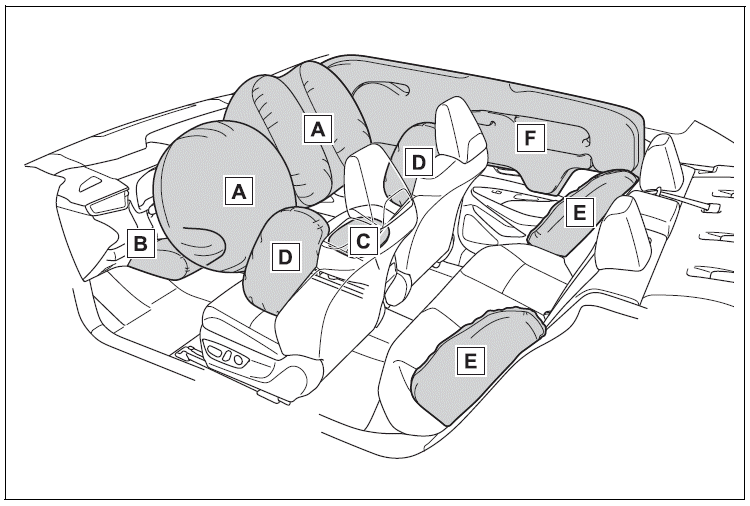
SRS airbag system
■ Location of the SRS airbags

Copyright © 2026 www.tocorolla12.com