
Toyota Corolla: Maintenance data (fuel, oil level, etc.) / Steering & Tires and wheels
Toyota Corolla 2019-2026 Owners Manual / Vehicle specifications / Specifications / Maintenance data (fuel, oil level, etc.) / Steering & Tires and wheels
Steering
Steering Less than 1.2 in. (30 mm)
Tires and wheels
► Type A

► Type B

► Type C

► Type D

► Type E

► Type F

 Clutch & Brakes
Clutch
Brakes
Minimum pedal clearance when depressed with a force of 67.4 lbf (300 N, 30.6
kgf) while the engine is running.
Parking brake lever travel when pulled up with a force of 45...
 Light bulbs
A: Wedge base bulbs (clear)
B: Wedge base bulbs (amber)
C: Double end bulbs..
Other information:
Toyota Corolla 2019-2026 Owners Manual: Adjusting the clock
■ Clock adjustment The clocks on the following can be adjusted on the audio system screen. Multi-information display Audio system screen ■ Setting the clock to be adjusted automatically by GPS 1 Press the “MENU” button. 2 Select “Setup” on the “Menu” screen. 3 Select “General” on the “Setup” screen. 4 Select “Clock”. 5 Select “Auto Adjust by GPS” to set to on. â..
Toyota Corolla 2019-2026 Owners Manual: Trunk
The trunk can be opened using the trunk opener, entry function or wireless remote control or key. WARNING Observe the following precautions. Failure to do so may result in death or serious injury. ■Before driving Make sure that the trunk lid is fully closed. If the trunk lid is not fully closed, it may open unexpectedly while driving and hit near-by objects or luggage in the trunk may be..
Categories
- Manuals Home
- 12th Generation Corolla Owners Manual
- Transfer contacts from device
- Sound settings
- Lubrication system (1.8 L 4-cylinder [2ZR-FAE] engine)
- New on site
- Most important about car
General settings
Settings are available for clock, operation sounds, etc.
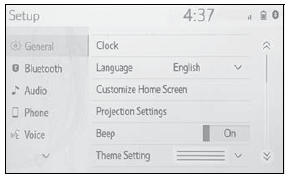
Displaying the general settings screen
1 Press the “MENU” button.
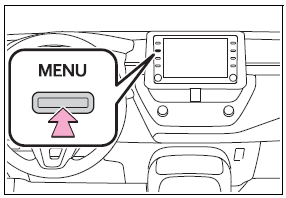
2 Select “Setup”.
If the general settings screen is not displayed, select “General”.
3 Select the desired items to be set.

Copyright © 2026 www.tocorolla12.com