
Toyota Corolla: Connected Services Overview / Type D: Function achieved by using DCM and a smartphone
Toyota Corolla 2019-2026 Owners Manual / Audio / Connected Services Overview / Type D: Function achieved by using DCM and a smartphone
The functionality of Service Connect is made possible by the use of a DCM and a smartphone.
Service Connect
Service Connect uses DCM to collect and transmit vehicle data that allows Toyota to provide:
- Vehicle Health Report (VHR) (Safety Recalls, Service Campaigns, Current Vehicle Alerts, Required Maintenance, and Vehicle Condition Status)
- Maintenance Notifications
- Vehicle Alert Notifications
■ Availability of function
- Service Connect is available in the contiguous United States, Washington D.C., Alaska, Hawaii, the United States Virgin Islands, Puerto Rico and Canada.

 Connected Services Operation. Toyota apps
Toyota apps is a function that enables certain apps installed on a smart phone
or the system to be displayed on and operated from the system screen. Before the
Toyota apps can be used, some setup needs to be performed...
Other information:
Toyota Corolla 2019-2026 Owners Manual: Customizing vehicle features
■ Changing by using the audio system screen 1 Press the “MENU” button. 2 Select “Setup” on the “Menu” screen. 3 Select “General” or “Vehicle” on the “Setup” screen. Various setting can be changed. Refer to the list of settings that can be changed for details...
Toyota Corolla 2019-2026 Owners Manual: Contacts/Call history settings screen
Contacts can be transferred from a Bluetooth® phone to this system. Contacts and favorites can be added, edited and deleted. Also, the call history can be deleted. 1 Display the phone settings screen. 2 Select “Contacts/Call History”. 3 Select the desired item to be set...
Categories
- Manuals Home
- 12th Generation Corolla Owners Manual
- Operating instructions
- Odometer and trip meter display
- Air conditioning controls
- New on site
- Most important about car
Unlocking and locking the doors from the outside
■ Smart key system (if equipped)
Carry the electronic key to enable this function.
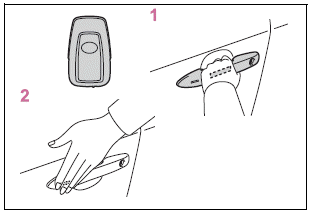
1 Grip the driver’s door handle to unlock the door. Holding the driver’s door handle for approximately 2 seconds unlocks all the doors. Grip the front passenger’s door handle to unlock all the doors.*

Copyright © 2026 www.tocorolla12.com