
Toyota Corolla: Audio / Voice command system operation. Voice command system
Toyota Corolla 2019-2026 Owners Manual / Audio / Voice command system operation. Voice command system
The voice command system enables the radio, phone dialing, etc. to be operated using voice commands. Refer to the command list for samples of voice commands.
 Error messages
â..
 Using the voice command system
■ Steering switch
A - Talk switch
► Voice command system
Press the talk switch to start the voice command system. To cancel voice command,
press and hold the talk switch...
Other information:
Toyota Corolla 2019-2026 Owners Manual: Child restraint system compatibility for each seating position
■ Child restraint system compatibility for each seating position Compatibility of each seating position with child restraint systems (®P.56) displays the type of child restraint systems that can be used and possible seating positions for installation using symbols...
Toyota Corolla 2019-2026 Owners Manual: Transfer contacts from device
When an Android Auto connection is established, this function will be unavailable. From phone (OPP compatible Bluetooth® phones only) ► When the contact is not registered 1 Select “Transfer Contacts from Device”. 2 Select “From Phone (Bluetooth)”...
Categories
- Manuals Home
- 12th Generation Corolla Owners Manual
- Transfer contacts from device
- Air conditioning controls
- Lubrication system (1.8 L 4-cylinder [2ZR-FAE] engine)
- New on site
- Most important about car
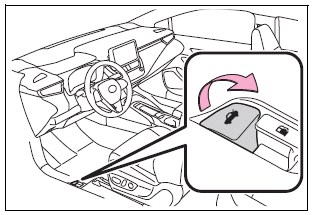
Opening the trunk
■ Trunk opener
Pull the lever upward to release the trunk lid.
■ Trunk release button (vehicles with a smart key system)
While carrying the electronic key, press the button on the trunk lid.
When all the doors are unlocked using one of the following methods, the trunk can be opened without the electronic key:
Entry function Wireless remote control Door lock switches Automatic door unlocking system Mechanical key
Copyright © 2026 www.tocorolla12.com