
Toyota Corolla: Using the driving support systems / Dynamic radar cruise control with full-speed range
Toyota Corolla 2019-2026 Owners Manual / Driving / Using the driving support systems / Dynamic radar cruise control with full-speed range
In vehicle-to-vehicle distance control mode, the vehicle automatically accelerates, decelerates and stops to match the speed changes of the preceding vehicle even if the accelerator pedal is not depressed. In constant speed control mode, the vehicle runs at a fixed speed.
Use the dynamic radar cruise control with full-speed range on freeways and highways.
- Vehicle-to-vehicle distance control mode
- Constant speed control mode
- System Components
- Driving in vehicle-to-vehicle distance control mode
- Setting the vehicle speed (vehicle-to-vehicle distance control mode)
- Adjusting the set speed
- Changing the vehicle- to-vehicle distance (vehicle-to-vehicle distance control mode)
- Vehicle-to-vehicle distance settings (vehicle- to-vehicle distance control mode)
- Canceling and resuming the speed control
- Approach warning (vehicle- to-vehicle distance control mode)
- Selecting constant speed control mode
 Indications on multi-information display
A - LDA indicator
The illumination condition of the indicator informs the driver of the system
operation status.
Illuminated in white: LDA system is operating...
 System Components
■ Meter display
A - Multi-information display
B - Set speed
C - Indicators
■ Operation switches
A - Vehicle-to-vehicle distance switch
B - “+RES” switch
C - Cruise control main switch
D - Cancel switch
E - “-SET” switch
WARNING
■Before using dynamic radar cruise control with full-speed range
Driving safely is the sole responsibility of the driver...
Other information:
Toyota Corolla 2019-2026 Owners Manual: Selecting shift ranges in the D position
To drive using temporary shift range selection, operate the “-” or “+” paddle shift switch. When the “-” paddle shift switch is operated, the shift range switches to a range that enables engine braking force that is suitable to driving conditions...
Toyota Corolla 2019-2026 Owners Manual: Engine (ignition) switch (vehicles without a smart key system)
Starting the engine 1 Check that the parking brake is set. (®P.180, 181) 2 Check that the shift lever is in P (continuously variable transmission) or N (manual transmission). 3 Firmly depress the brake pedal (continuously variable transmission) or clutch pedal (manual transmission)...
Categories
- Manuals Home
- 12th Generation Corolla Owners Manual
- Changing settings of the pre-collision system
- Electric parking brake
- Sound settings
- New on site
- Most important about car
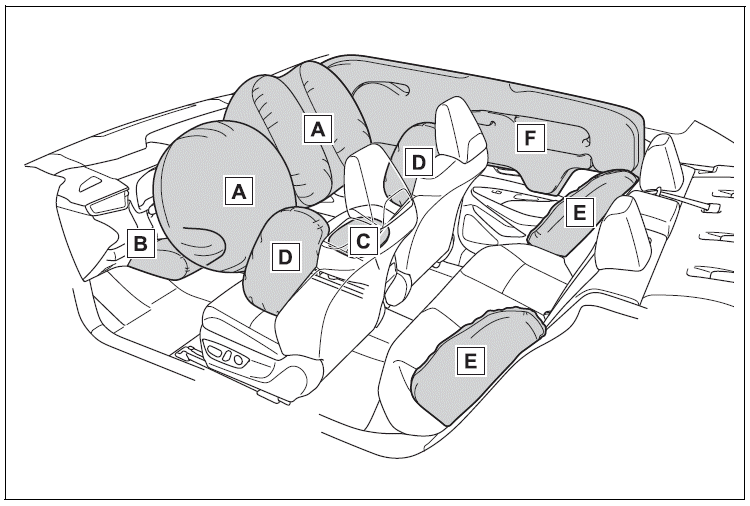
SRS airbags
The SRS airbags inflate when the vehicle is subjected to certain types of severe impacts that may cause significant injury to the occupants. They work together with the seat belts to help reduce the risk of death or serious injury.
SRS airbag system
■ Location of the SRS airbags

Copyright © 2026 www.tocorolla12.com