
Toyota Corolla: Do-it-yourself maintenance / Tires
Replace or rotate tires in accordance with maintenance schedules and treadwear.
- Checking tires
- Tire rotation
- Tire pressure warning system
- Installing tire pressure warning valves and transmitters (vehicles with a tire pressure warning system)
- Initializing the tire pressure warning system
- Selecting wheel set
 Adding the washer fluid
Add washer fluid in the following situations:
A washer does not work.
The warning message appears on the multi-information display.
NOTICE
■ Do not use any fluid other than washer fluid
Do not use soapy water or engine antifreeze instead of washer fluid...
 Checking tires
Check if the treadwear indicators are showing on the tires. Also check the tires
for uneven wear, such as excessive wear on one side of the tread.
Check the spare tire condition and pressure if not rotated...
Other information:
Toyota Corolla 2019-2026 Owners Manual: Adding the washer fluid
Add washer fluid in the following situations: A washer does not work. The warning message appears on the multi-information display. NOTICE ■ Do not use any fluid other than washer fluid Do not use soapy water or engine antifreeze instead of washer fluid...
Toyota Corolla 2019-2026 Owners Manual: Indicators
The indicators inform the driver of the operating state of the vehicle’s various systems. Turn signal indicator Headlight indicator Tail light indicator Headlight high beam indicator Automatic High Beam indicator PCS warning light Cruise control indicator Dynamic radar cruise control indicator Cruise control “SET” indicator LTA indicator BSM outside rear view mirror indicators BSM indi..
Categories
- Manuals Home
- 12th Generation Corolla Owners Manual
- Operating instructions
- Odometer and trip meter display
- Electric parking brake
- New on site
- Most important about car
General settings
Settings are available for clock, operation sounds, etc.
Displaying the general settings screen
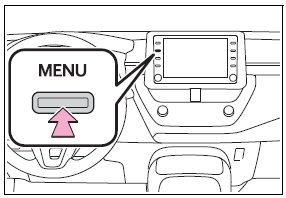
1 Press the “MENU” button.
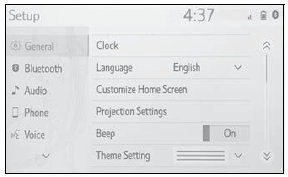
2 Select “Setup”.
If the general settings screen is not displayed, select “General”.
3 Select the desired items to be set.

Copyright © 2026 www.tocorolla12.com