
Toyota Corolla: Maintenance and care / Do-it-yourself maintenance
Toyota Corolla 2019-2026 Owners Manual / Maintenance and care / Do-it-yourself maintenance
- Do-it-yourself service precautions
- Hood
- Positioning a floor jack
- Engine compartment
- Tires
- Tire inflation pressure
- Wheels
- Air conditioning filter
- Wireless remote control/ electronic key battery
- Checking and replacing fuses
- Light bulbs
 Emission inspection and maintenance (I/M) programs
Some states have vehicle emission inspection programs which include OBD (On Board
Diagnostics) checks. The OBD system monitors the operation of the emission control
system...
 Do-it-yourself service precautions
If you perform maintenance by yourself, be sure to follow the correct procedure
as given in these sections.
Maintenance
WARNING
The engine compartment contains many mechanisms and fluids that may move suddenly,
become hot, or become electrically energized...
Other information:
Toyota Corolla 2019-2026 Owners Manual: Selecting wheel set
Your vehicle is equipped with tire pressure warning system with the function to have ID codes registered for a second wheel set, for example a winter set, by Toyota dealer. After registration of a second wheel set, either of these two wheel sets can be selected for usage with the tire pressure warning system...
Toyota Corolla 2019-2026 Owners Manual: Lubrication system (2.0 L 4-cylinder [M20A-FKS] engine)
■ Oil capacity (Drain and refill [Reference*]) The engine oil capacity is a reference quantity to be used when changing the engine oil. Warm up and turn off the engine, wait more than 5 minutes, and check the oil level on the dipstick. ■ Engine oil selection “Toyota Genuine Motor Oil” is used in your Toyota vehicle...
Categories
- Manuals Home
- 12th Generation Corolla Owners Manual
- Changing settings of the pre-collision system
- Odometer and trip meter display
- Unlocking and locking the doors from the outside
- New on site
- Most important about car
iMT (Intelligent Manual Transmission)
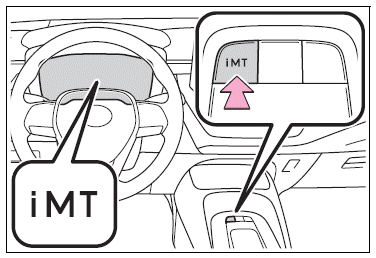
The iMT optimally controls the engine speed to suit the driver’s operation of the clutch pedal and shift lever, helping the driver to shift gears more smoothly. Additionally, when the clutch pedal is operated, the iMT helps reduce shift shock, allowing for lighter shift operations when driving on a winding road or incline.
Press the “iMT” switch.

Copyright © 2026 www.tocorolla12.com